M’gawd.

I spent some time the other night with a hex editor and a fresh default copy of an .rdt file for the MD380, thinking, “How hard can this be to reverse engineer and build an actually decent and usable contact manager?”

Oh, honey.  It’s hard.  Because the record format is a mess.  (This, I hasten to add, is Moto’s fault — not Tytera’s.  It’s Moto’s file format, they’re just living with it.)

They have a whole bunch of settings — some of which have no relationship to others — overloaded bitwise into single bytes.  Now I don’t really have a problem with that, it’s a standard way to save space in a record format for yes/no checkboxes and multi-choice lists, but really, they should have arranged things better; it’s like they tried to cram everything they possibly could into a single byte, then ran out of room (or someone woke up and realized what a Charlie Foxtrot they’d made of the record structure, but by then it was too late if they wanted to preserve backward compatibility) and started using other bytes in a slightly-more organized fashion.

What really blew my mind, though, was how they set frequencies for channels.  I would have thought they might have used a floating-point, real number for that purpose; two bytes would easily suffice if they did.  But no, they use four bytes and they set them to contain the actual digits that you type into the frequency box.  For instance, if you are setting a frequency of 443.850 MHz, the file contains four bytes as follows: “00 50 38 44”.  That is a faux little-endian method of storing the number; reading it from the right-most to the left-most byte gives you the frequency, which is always stored by DMR2 in the format nnn.nnnnn .  This doesn’t really upset me much, because it isn’t that difficult to read those four bytes and convert them to eight characters of text in a text box.

But it shouldn’t be too hard to suss out the bit settings for the other data, and of course any text in the record (i.e. the channel name) is just plain old 2-byte Unicode.  It’s just a shame that Moto/ConnectSystems/Tytera haven’t felt the need to produce a truly usable piece of modern contact and channel management software to go with their space-age radios.

DMR2 software is really not particularly user-friendly.

I’ve been working with the DMR2 programming software that shipped with the Tytera MD-380 and I have to say, as a programmer and interface designer myself, it really isn’t particularly intuitive or user friendly.

First, it opens a blank RDT called, imaginatively, “default1”.  It does not open the last file you opened and it doesn’t provide a list of recently-viewed files in the File menu.  That’s just annoying, not buzz-killing.

Second, rather than using a tabbed interface like so many modern Windows programs do, it opens a separate MDI window for each item you click on.  So you can end up with a buttload of windows open and not even realize it.  You can use the Window menu item to navigate between windows, but wouldn’t a tabbed interface make more sense?

Next, as seems usual and proper for most radio-oriented software, there is no integrated help file.  Since the manual for the radio is nearly unreadable to a native English speaker — well, I exaggerate, but the Chinglish factor is high — that is a significant omission.

Programming a contact is fairly simple once you understand all of the options you can set and which of them you need to leave the hell alone.  But, for instance, let’s look at what I had to do in order to add the Parrot channel to the Indy zone (for some reason it didn’t pre-exist in the CS700 codeplug I hacked for the MD-380).

First, I looked at one of the other Parrot channels that was already in place.  I created an Indy Parrot channel based on those settings, and programmed it with the information for the Floyd Knobs Parrot which was right above it at the end of the list.  I only had to change the repeater frequencies so they matched the W9AMT repeater in Indy.

I tried to find a way to move the new channel up the list so that it would be in the same part of the list with the rest of the Indy channels, but no dice on that.  No huhu, you set the channel number and assign it to a zone in another part of the program.

Yeah, that’s right.  You now have to assign the channel to the zone IN A COMPLETELY DIFFERENT WINDOW.  So you run up the list to Zone Information, and click on the Indy zone.  That brings up a selection window, and you run down the list, find the Indy Parrot you just made, highlight it, and click the “Add>>” button.  That adds the channel to the smaller list of channels that are specific to the Indy zone.

For some reason it didn’t penetrate my head that I had to take that second action.  I made the channel and updated the radio and “Indy Parrot” wasn’t in my Indy zone.  After some head-scratching, I realized my mistake, and took the second action to add it to the zone, and re-uploaded the codeplug.  Ah!  Now I have an Indy Parrot.

It seems to me that this ought to be part of the channel programming information, and I thought it was — because I did set the Scan List parameter in the channel screen to “DMR Indy”.  I know now that that is not the same as adding the channel to the Indy zone.

At the very least I would have thought that would be in the help file.  Oh, wait — no help file!  And frankly, the information on the web that “explains” how to program a DMR radio isn’t all that great.

These radios are just aching for someone like RT Systems to come along and write usable programmers for them.

Took the DMR plunge

I thought I was going to do that with the ConnectSystems CS7000, but CS is taking way too long to bring that radio to market.  So when State of the Art Communications in Russiaville got in a load of Tytera MD-380 DMR handhelds and put them on eBay for under $200 shipped, and with the programming cable to boot, I bit.  (That link looks like it’s good till about July 4, unless they sell them out before that.)

I think I ordered it Sunday and I got it today.

I was a bit irked however that the Hoosier DMR group doesn’t actually offer a codeplug for the MD-380.  In fact they seem to be more interested in throwing DMR repeaters up all over the state than in keeping their website up to date and useful.  It is not simple to program one of these handhelds by hand, and you probably wouldn’t want to, anyway, since the codeplug I ended up hacking (originally for the CS700) contains over 700 digital contacts.

So I did manage to hack the codeplug with my copy of UltraEdit, no huhu, and used the DMR2 software that I downloaded from TYT to load it in.

My only irk at the moment is that the battery is taking God’s own time to charge.  It was showing a full battery indicator when I powered it up the first time, but I thought I’d stick it in the charger and top it off as the manual recommends.  I did see a review somewhere that carped about this radio taking “hours” to charge…I don’t think they were lying.

And the manual…is written in liberal Chinglish.  It is not unreadable but it is not something I’d take to bed with me, because it would irritate me too much.  And interestingly enough there is no photo anywhere in the book that tells you what the different icons on the (very nice) color LCD screen are.  I guess you just have to guess.  This radio could benefit from someone doing a significant edit on it like the one that was done for the Baofeng UV-5R.

All that said, the sound is pretty good for digital.  Nice and crisp and punches right out there except when someone gets too close to the end of the repeater’s rope, and then it just cuts off.  The cool thing was powering it up and hitting the SCAN button and immediately being rewarded by hearing a QSO between a guy in Ontario and another guy in Florida on the North America talk group.

The radio has a nice shape and size — some reviewer likened it to a brick, both in shape and in heft — and appears quite well made, although I imagine the plastic spring belt clip will not last long.  It has a typical stock rubber duck, of course, but it’s a 70cm radio so the shortness probably isn’t all that critical.  It does have a standard SMA connector, though, so I might try the Diamond SRH77CA from my Yaesu VX-8G on it just for kicks.

And because I am a nice guy, here is the codeplug I’m using, with my call and radio ID edited out of course, so you’ll need to load this into the software to change it.  It’s a .ZIP file because WordPress objected to the bare .RDT file.

md380hoosierdmr06-01-15-generic-rdt

Go me

Two new DXCC entities in the last two days — Romania and Costa Rica.  I’ve tried to get a TI in the log before, but they’re kind of right off the end of my antenna, and I’ve not had any luck.  That makes 39 in LoTW plus the one physical card I have from Sig, 5Z4EE in Kenya (about six weeks before he went QRT), for a total of 40 DXCC entities in a little over a year without even trying very hard.

I’m sure KIZ would tell me that I’d be farther along if I did CW.  🙂  On the other hand, I have only 581 QSOs total since April 2014, so I’m not burning the midnight oil to work the other side of the world, either.

It’s just a hobby. Isn’t it?

Field Day Battery Box

For some time I have been considering what to do about portable power for QRP, specifically with the Yaesu FT-817ND I bought back in late January.  (And which, damn it, I dropped last Thursday on the porch while struggling with the screen door and a handful of other stuff, and managed to bend and break the AF-SQL/RF control…so now it needs to go to Yaesu for some TLC before I can use it again.  Damn it.)

I’ve got some computer UPSes sitting around that no longer work when power is unapplied, so I pulled the batteries out of one of them to see if they could be salvaged or if it was the batteries that were actually causing the problem.  Since the batteries (7.5Ah AGM’s) were both charged and would successfully take a charge when discharged, it’s fairly clear that the UPS electronics were hosed, at least in this case.

I didn’t have another UPS like this one and the others didn’t contain this type of battery, so at first I was thinking I’d just build a two-battery, 15Ah power box of some sort.  So I went looking online for designs or suggestions and found this.

The only thing I didn’t like about the Joulery Box was that it was simplistic; four batteries, a circuit breaker, and two Powerpole outlets.  In my way of thinking, the box isn’t just for Amateur Radio, it’s also for emergency power at home during a blackout.  A box like this ought to be able to charge phones, for instance, or run some 12V LED lighting or whatever — not forever, just overnight.  And I wanted a meter on the case so I could monitor voltage and not run the batteries down so far as to ruin them.

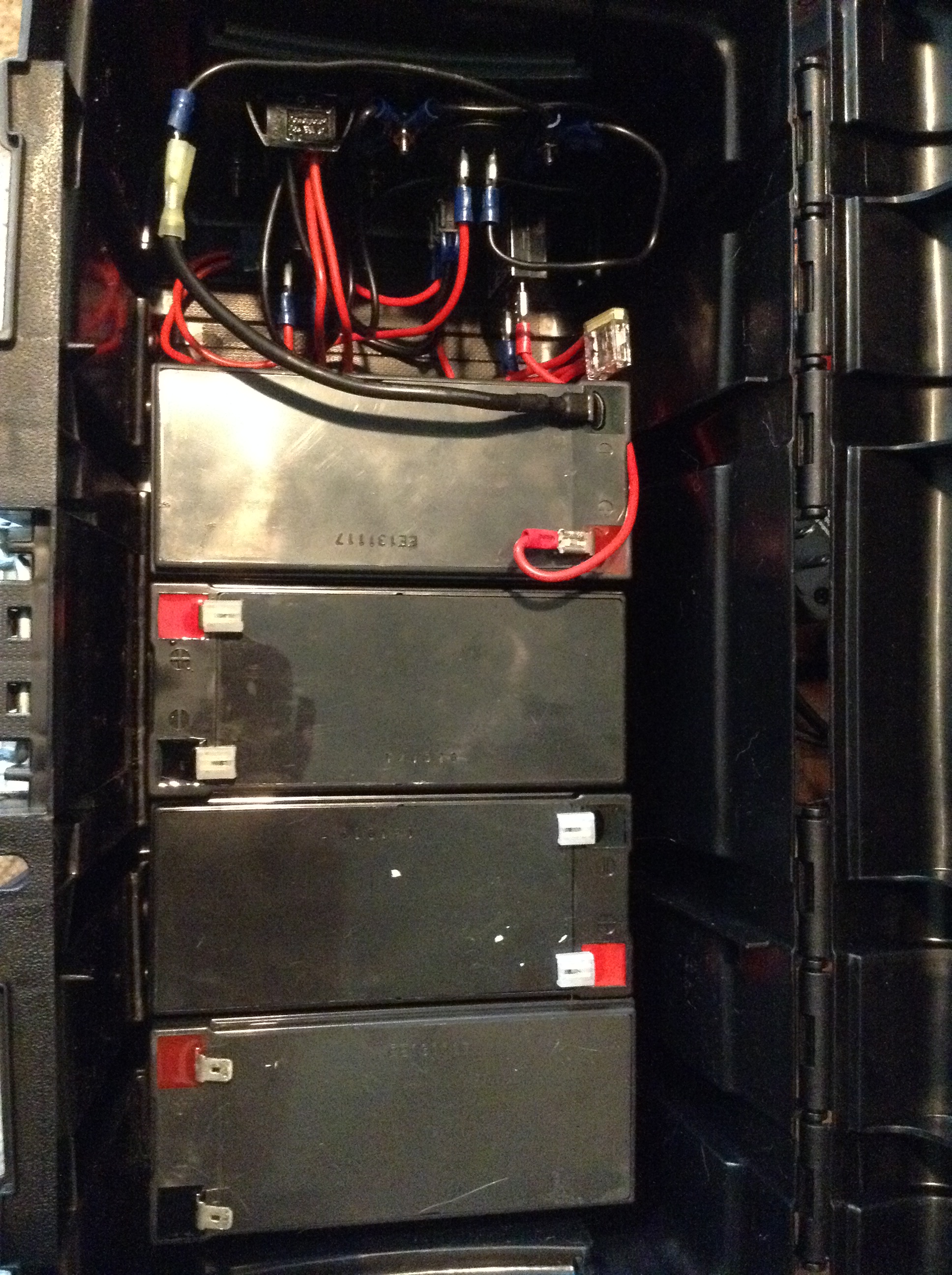
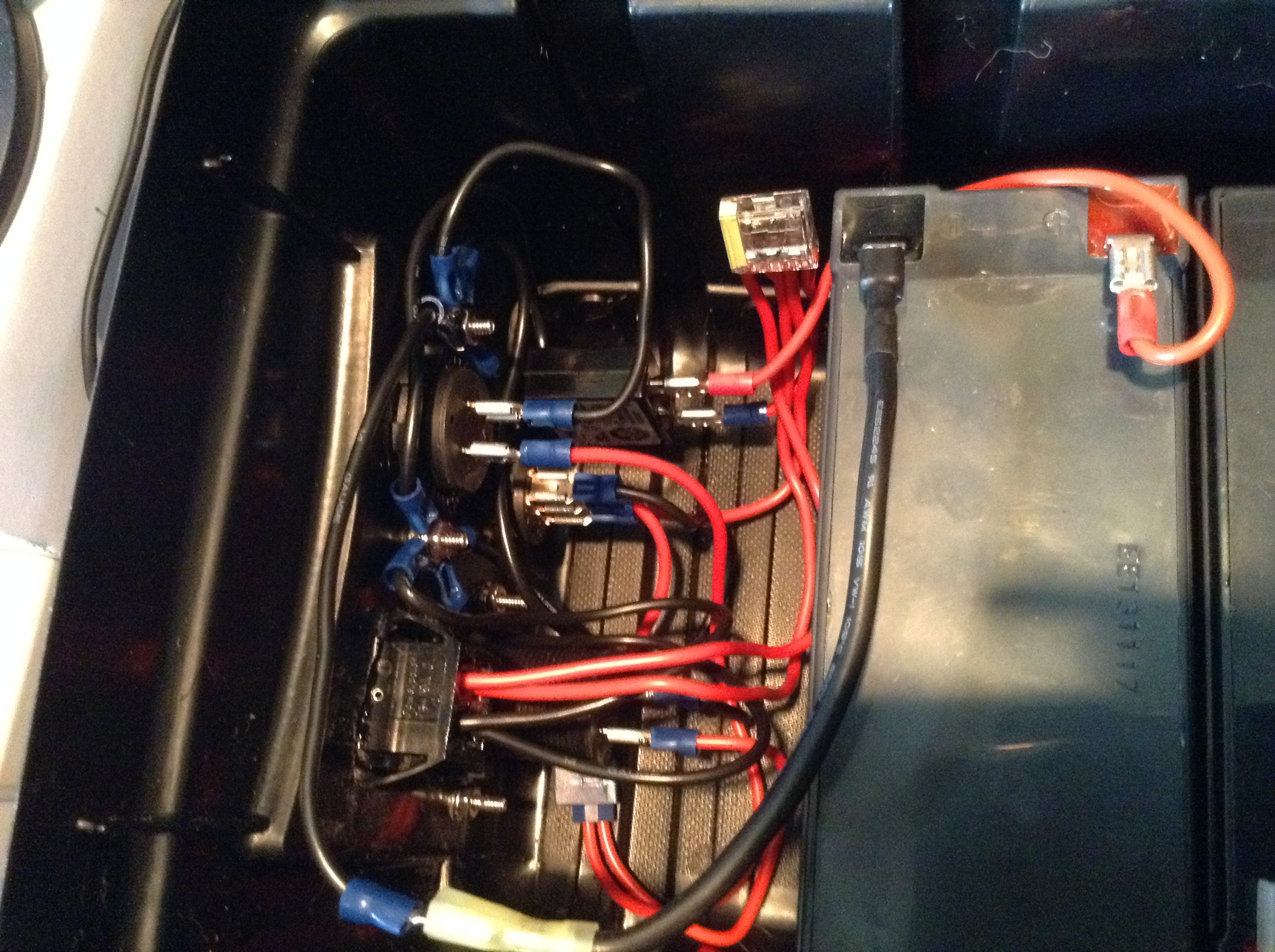
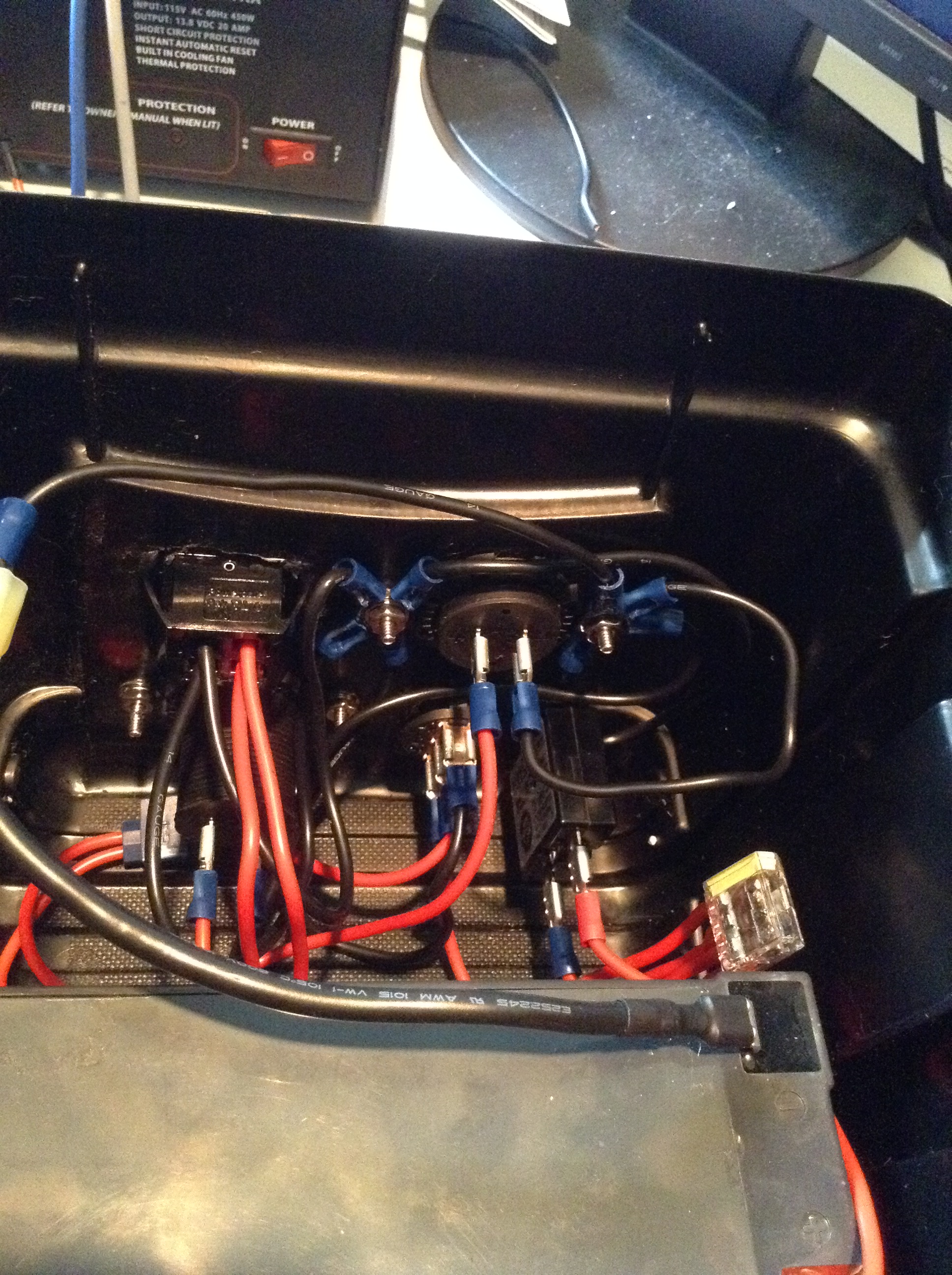
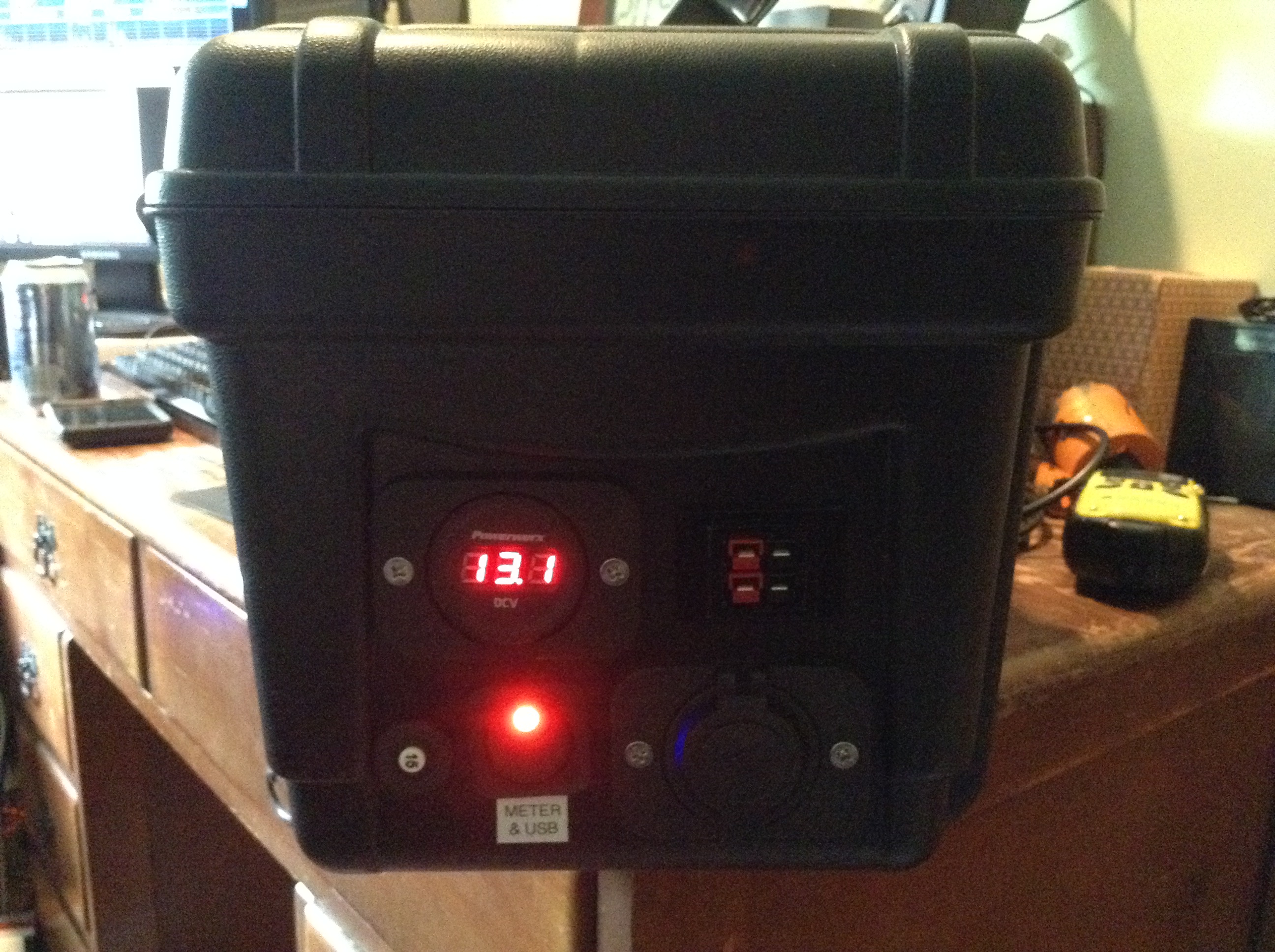
So voila, the KC9YTJ Battery Box, with an LED voltmeter and a dual USB charging port.  The meter and the port are downstream of a switch so they can be turned off to conserve power when not needed.  (I figure I can just flip the switch to check the voltage.)  At this point, I just need some piggy-back terminals to finish wiring the batteries in parallel, and to fasten the batteries down so they don’t shift in transit. The rest is done and tests fine with one battery. As with W4KDA’s Joulery Box, the batteries are charged through one set of the PowerPoles. Eventually I may use a solar panel to trickle-charge the box through a charge controller, but right now it charges fine with a Deltran Battery Tender Junior.

Here are some current pics.  When I get the battery bus wired, I will post another picture of that, but right now as you see, the batteries are just sitting in the box waiting patiently.

2015-05-17 16.42.59 2015-05-17 16.43.40 2015-05-17 16.44.34 2015-05-17 16.44.54 2015-05-17 16.45.40 2015-05-17 16.46.19 2015-05-17 16.46.59

I’m intrigued

by the idea of PSK63 APRS on 30 meters, and I have it set up and working (see KC9YTJ-63 on FindU or APRS.fi) but that’s just temporary because it’s monopolizing my FT-450D and the only HF antenna I have up.

It also seems to take a lot of power just to be heard.  I’m running 50 25 watts at the moment, although I suppose I will cut it back and see how low it can go before it fades out to unintelligibility.

I’m considering setting up a fixed station and possibly digipeating on 30, but the trick is finding an inexpensive (HAH!) HF SSB transceiver to dedicate to it.  And of course an antenna of some sort, probably a vertical.

I suspect this project will go on the back burner till after the Indy Hamfest.

ETA:  I cut the power back to 25 watts.  Still being heard.  I’ll probably cut it down to 10 later this afternoon.

BOR-ing.

The ARRL Field Day 2015 T-Shirt is…well, go look, see what you think.

Compared to last year’s shirt, that is just a plain old yawner.  I looked at the grey one first and went “eh,” then looked at the red one and I think the grey one is actually a better looking shirt.

Don’t know what they’re thinking in Newington, but that’s pretty punk compared to what’s come before.

I must not understand.

Mind you, I’m not a contester and I don’t even play one on TV.  I have WAS Basic (and digital, if I could arse myself to turn in the application) but I figure I’ll get DXCC when DXCC comes my way.  And so forth.  I haven’t even hung a bunch of QSL cards around my station; they’re in the log, I don’t need wallpaper.

But I’m a little curious as to when the League is going to get off its butt and finish the application forms for the Cerntennial QSO party it held starting a year ago last January 1, and ending this past New Year’s Eve.  It’s like they started the party before they’d figured out how they were going to administer it.  (No!!!)  They did adjust the requirements a bit for the various levels (starting at 1,000 points for the 1st Level award) during the year, but that shouldn’t cause a problem for applications.  According to the website, all of the Q’s had to be uploaded to LoTW in order to be count toward the award:

In order to compete in the Centennial Points Challenge, logs must be submitted through Logbook of the World (LoTW). Logs do not need to be changed from the normal Cabrillo (contest logs) or ADIF (general logging file) files. The system will automatically look for points-qualifying QSOs from submitted logs and apply them to each participant’s Centennial QSO Points table. QSOs do not have to be matched in LoTW for points to be achieved – this is an honor-based QSO Party. We cannot accept any paper forms or information for the Centennial Points Challenge.

So they already have all of the information they need for scoring (they closed the books over a month ago, on January 15). You can check the leaderboard easily enough (I have 1,105 points and am tied for 15,716th place).

So what is stopping the League from putting an application online?  All they need from you is your call sign and whatever $$$ they are charging for the certificate.  They have everything else and can pre-fill the form for you.

Is it just a simple matter of programming that should have been completed months ago?  Or is there something more complex at work here?  Beats the heck out of me what could be more complex about putting in an application for the Centennial QSO Party award.  Bottom line it seems to me that they ought to just publish a list of the folks who qualify for the various levels instead of waiting around for some nebulous web form to be written and debugged that should already have existed and been ready to go as of January 15, 2015, at the latest.  That costs them nothing.  If you want a certificate, the existing structure to put in for WAS and DXCC and so forth ought to be able to handle that.

I dunno.  If I were Kay Craigie, I’d be asking some questions and getting some answers.  In the Masons we talk about how it’s a volunteer organization and you have to be careful about how you deal with volunteers, or like as not they’ll walk away.  But we also have paid staff at the Grand Lodge level, just like the ARRL does.  Sounds to me like someone at the ARRL isn’t doing their job.

I’ll be happy to retract any and all of this if the League would just get out there and tell us what’s taking so long to do something that seems so simple.

QRP

So on my way to DC last week, I stopped in at Universal Radio and bought a Yaesu FT-817ND.

I’ve really wanted a portable radio for travel that didn’t involve building and lugging a full-blown go box.  Something I can carry on a plane and take to Florida, for instance.  And I’ve discovered lately (see previous post) that you really can work long distances with a few watts.  So the 817 seemed like a natural for that.

I didn’t do much more than charge the battery and fiddle with it on my trip.  Not much time to begin with and no HF antenna available.  So when I brought it home, I hooked it up to my shack computer and G5RV and tried some digital modes.

No dice.  Absolutely no RF went out on the wire.  Couldn’t figure out why.

So I set it aside and read the manual.  I discovered that there is a dedicated DIG mode.  Of course I was trying to send digital on USB, like normal.  So I switched to DIG mode and voila, the wattmeter jumped and I showed up on PSKReporter.

With only three (3) watts, I was being heard at -12db in Portugal.  I didn’t work anyone there but it was showing up on the PSKReporter map.

I think I could grow to like this little rig.  I have an ATAS-25 portable antenna coming, we’ll see how that works when it gets here.


Interesting times.

So a G5RV isn’t supposed to be all that great on 15m, and my G5RV isn’t really set up right anyway; it’s more of a V (not an INVERTED V) with the feed point at about 25 feet and the ends at about 35 feet.* And propagation tonight, frankly, sucks. And I was only running 8 watts on JT9.

And I still got three stations in Japan on 15m JT9.  Go figure.

_______________

* Not much I can do about it right now; going to stick a Spiderbeam fiberglass pole in there at some point soon I hope.